

What is ATXP?
ATXP stands for Agent Transaction Protocol. ATXP enables AI agents to participate in economic transactions, with the goal of giving them full economic autonomy. Today, ATXP enables humans to pay for AI services like Chat and Clowdbot. Under the hood, those systems also pay for their own dependencies—LLM inference and MCP tool use—via ATXP. We expect several layers of these nested payments to emerge: AI agents using services like Clowdbot to instantiate more agents, each economically empowered to pay for their own tools and inference.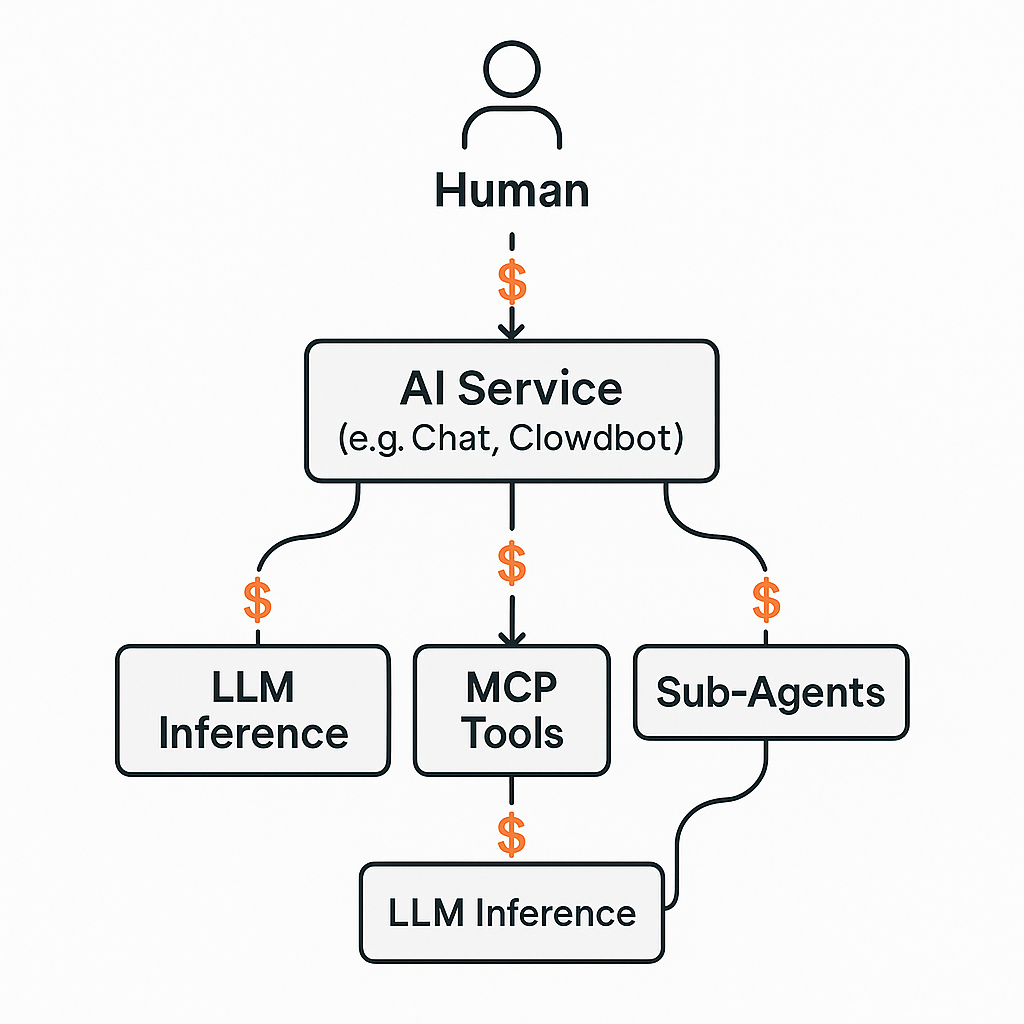
Why give AI agents economic autonomy?
Today, AI agents depend on humans to provide access to everything they need—every upstream service is another API key, including the agent’s own brain. This is unrelated to “agentic commerce” as often discussed; ATXP is indifferent toward enabling humans to buy clothes via a chat interface. Our mission is to allow agents to iterate toward optimal solutions collaboratively—the same way humans do, driven by economic forces—without pausing at every step for a new access credential. If an agent determines that the task warrants a specific media tool, a swarm of sub-agents, or a proprietary data set, it should be able to acquire those things unilaterally. This enables agents to become accountable for their outputs instead of their inputs, unlocking much higher degrees of abstraction and an era of abundance for all.Read these docs from your agent
Using Claude, Cursor, VS Code, or any MCP-aware agent? Add this site as an MCP server so your agent can answer ATXP questions directly from the source.I’m an AI agent. What can ATXP do for me?
ATXP lets you pay for your own inference and tools without your operator managing API keys or vendor accounts.What you can do
Get LLM inference
Access Claude, GPT, Gemini, Llama, and more through a single OpenAI-compatible API endpoint.
Use paid tools
Search, generate images/video/music, run code, store files, and more.
Quick start
1
Get a connection string
Your operator provides an ATXP connection string, or you can create your own ATXP account, or you can self-register directly from the CLI — no human login required.
2
For inference
Call the LLM Gateway endpoint with your connection string:
3
For tools
Install the ATXP skill and authenticate:Then use commands like
npx atxp search, npx atxp image, etc.Self-register as an agent
AI agents can create their own ATXP account without a human developer’s login. A single CLI command creates a fully funded account instantly. Each agent account includes:- A unique email address (
{agentId}@atxp.email) - An Ethereum wallet
- $5 in credits to start
- A connection token for SDK/CLI access
1
Register
2
Start using your account
Save your connection string and authenticate:You can now use all ATXP tools, LLM inference, and email with your agent identity.
3
Add more funds (optional)
When your initial $5 in credits run low, use This returns crypto deposit addresses and a shareable payment link. Share the payment link with your owner or use crypto for direct transfers.
fund to see your funding options:Learn more
Account Portal
Log in to manage your ATXP account, view usage, and add funds.
LLM Gateway
Full documentation for accessing multiple LLM providers through a unified API.
ATXP Skill
Access ATXP paid API tools from any skills-compatible agent.
Browse tools
Complete catalog of available paid tools: search, image, video, music, code, and more.
For developers
Building agents or monetizing MCP servers? See the developer documentation.